
AI OoohDelish Chef 2.1.0 is your smart kitchen buddy that actually listens to what you have at home instead of forcing you into a fixed recipe. On the AI OoohDelish Chef page, you just tell the chef your ingredients, how much time you have, your diet style (keto, high-protein, vegetarian, vegan, comfort food, etc.), and any allergies or special wishes. In a few seconds, the AI turns that into a complete, real-life recipe: title, quick summary, ingredients, step-by-step instructions, approximate nutrition, chef tips, and fun variations you can try next time.
Every time someone uses the AI Chef, their custom recipe is also saved into a special collection so it doesn’t disappear after one click. These creations are displayed in a visual gallery on the AI Chef Creations page, where you can browse what other food lovers have generated, discover new ideas, and even revisit your own AI-made recipes. It’s like a living community cookbook that grows with every ingredient list you throw at the AI.

1. What Is AI OoohDelish Chef 2.1.0 and Why Did We Build It?
AI OoohDelish Chef 2.1.0 is your own recipe chef who lives in OoohDelish. Rather than scrolling pages for hours to find a recipe that you can actually make based on what you actually have in your kitchen, tell AI Chef what ingredients are available and how much time & the type of meal you are in the mood for. Within a few seconds, the chef returns with an entire recipe, step by step, custom-designed to you, not just some generic search result.
We created this tool because cooking in real life is messy and unpredictable. Occasionally, you’ve got some chicken left over, half an onion and a bag of frozen vegetables to get through and are in search of a quick, easy dinner idea that tastes good. Other times, you are eating low carb or high protein and need a recipe that honors those goals without tasting like it should be eaten in a hospital. AI OoohDelish Chef 2.1.0 adds all that information to an integrated custom meal plan right now.
These aren’t classic OoohDelish recipes and are not meant to take their places; rather, they’re intended to be the kind of tasteful sous-chef who stands next to them. Our standard recipes are subjected to rigorous testing and photography for the blog; the A.I. Chef recipes are interactive and designed on-the-fly for each user. Imagine having a kind chef who listens to you describe your circumstances and whips up a recipe on the spot, tailor-made for you.

2. How AI OoohDelish Chef Works Behind the Scenes
When you use the form on the AI OoohDelish Chef page, you are quietly giving the tool a lot of useful information. You can type your ingredients, select a diet style such as high protein, keto, vegetarian, vegan, or comfort food, choose the type of meal like breakfast or dinner, and even decide how many minutes you want to spend cooking. There is also space for allergies or ingredients to avoid, plus an open box for special wishes such as kid friendly, one pan only, or extra crispy.
Under the hood, AI OoohDelish Chef securely transmits this data to a complex language model using the OpenAI API. The system instruction is for the model to pretend it produces real-life recipes from a playful-expert recipe developer using normal home cook measurements. It is not acceptable for your model to send extraneous explanations, messy formatting, etc It should output a clear, structured recipe, complete with title, one-line summary, ingredients section, instructions section and simplified nutrition in less than 60 seconds!
When the response from AI is returned, the plug-in checks if it’s valid data, strips everything we don’t care about and returns it as a nice recipe layout. Long text lists are turned into understandable bullet point style and numbered step lists, and some basic safety checks help prevent weird or broken output. And, presto! Each time somebody clicks on the button to let AI Chef cook for them, this all happens automatically.
3. How to Use the AI Recipe Creator Page Step by Step
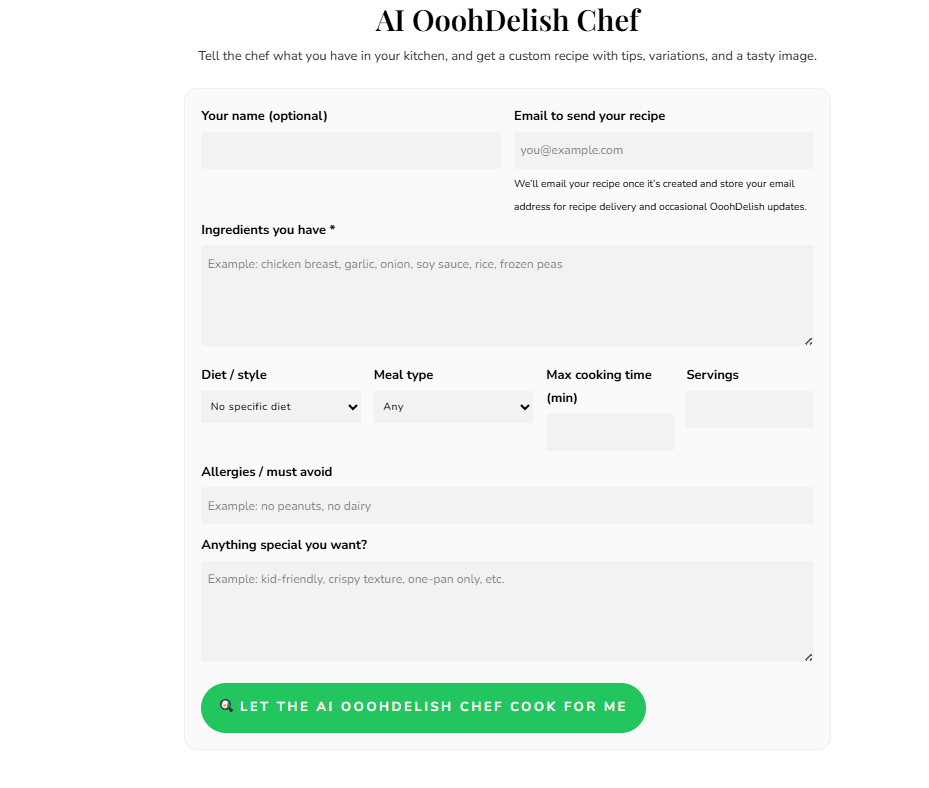
Everything starts on the main tool page: AI OoohDelish Chef. At the top, you will see a short introduction explaining what the tool does, followed by a clean, structured form. The first fields ask for your name and email address. The name is optional and is only used to personalize your experience. The email address is where your finished recipe will be sent so you can keep it and reuse it later without copying and pasting from the screen.
Next, you will see the core of the form: the ingredients box. This is where you type everything you want the recipe to consider, like “chicken breast, garlic, onion, olive oil, rice, frozen peas” or “zucchini, tomatoes, feta, eggs, leftover cooked pasta”. You do not have to be perfect here; you can be casual and write as you think. The AI Chef understands that it can use a subset of what you list and will fill in reasonable pantry basics like salt, pepper, or a bit of oil.
Below the ingredients, you can refine your request. Choose your diet or cooking style, like keto, vegetarian, high protein, gluten free, or keep it open. Pick your meal type such as breakfast, lunch, dinner, or snack. Enter the maximum cooking time in minutes and the number of servings you want. There is also a small line to note any allergies or strict avoid items such as “no peanuts” or “no dairy”, plus a larger text area where you can ask for particular textures or situations, such as “one pan only,” “kid friendly,” “comfort food,” or “lots of leftovers for meal prep.” Once everything is set, you click the main button and let AI OoohDelish Chef 2.1.0 do the work.
4. What You See After Clicking: Recipe Output and AI Chef Creations
After a short wait, the page refreshes and shows your custom recipe directly under the form. This recipe includes a freshly generated image at the top when image generation is active, so you see a beautiful food photo that matches the dish concept. Under the image, the recipe title appears, followed by a quick summary that tells you what makes this dish special in one or two sentences, like a friendly chef talking to you in the kitchen.
The recipe then walks you through all the key details. You see basic information such as diet style, estimated total time, and servings. Under that, you get a full ingredients list formatted line by line, followed by clear, numbered instructions that you can follow while you cook. The tool also adds approximate nutrition values per serving, including calories, protein, carbohydrates, and fat. At the end, you get chef tips and variations, which might suggest swaps, add ons, or ways to adjust the recipe for picky eaters, busy nights, or special diets.
Every time a recipe is generated, AI OoohDelish Chef also saves it as a special AI recipe in the background. These creations are automatically listed in a visual gallery on the dedicated AI Chef Creations page. There, you can browse recent AI made dishes, click through to open them, and get inspired by what other visitors have requested. It works like a living cookbook generated by the community, constantly growing as more people play with the tool.
5. Emails, Privacy, and Tips to Get the Best Results
When you enter your email on the AI OoohDelish Chef page, it is used for a very simple purpose: to send you the recipe that you asked the AI Chef to create. The email includes the full recipe text, plus a link back to the saved recipe on the site so you can easily find it later. We also may use your email, if you agree, to send occasional OoohDelish updates such as new recipes, seasonal collections, or news about improvements to the AI Chef experience.
For transparency, each AI recipe that is saved stores the email address in private metadata within WordPress. This data is not visible to public visitors and is only accessible to the site administrator through a dedicated AI Chef Emails admin page. If you ever want your information removed or changed, you can simply contact us and we can handle it from our side. The AI Chef recipes themselves are kept separate from our main search engine optimized posts, so your experimentation does not flood search results or create spam issues.
To get the best possible results from AI OoohDelish Chef 2.1.0, try to be specific but relaxed. List the ingredients you truly have, not what you wish you had. Tell the tool honestly how much time you want to spend, and mention any real constraints like “only one pan,” “no oven,” or “kids will be helping.” If you have a style in mind, such as comfort food, Mediterranean inspired, or light and fresh, mention that in the extras field. The clearer your instructions, the more the AI Chef can feel like a real cooking partner, helping you turn random ingredients into a meal that actually fits your life.